Summary
Molly Burke shows how VoiceOver helps her read and respond to comments. Her experience choosing kitchen technology also shows why an app is only useful if its controls are accessible.
Creators in this list
Pulenaz
Pulenaz has a relaxed, direct presence on camera. Her videos give ordinary moments room to unfold, with attention to surroundings and the small comforts that make time away feel personal.
A curious viewer following the demonstration and comparing the steps.
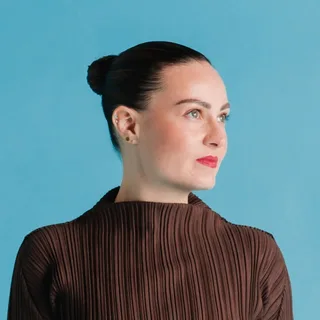
Molly Burke
@mollyburkeofficial
Molly Burke is a speaker, author and digital creator. Her videos have a personal, conversational presentation, with style and everyday experiences among the subjects.
Blind creator sharing everyday accessibility and firsthand technology use.
Account sources: Pulenaz on Instagram (@pulenaz) · Pulenaz on Telegram (@pulenaz)
A phone can make a conversation accessible
Molly Burke is a blind creator who talks about accessibility through the things she does every day. Start with her VoiceOver demonstration: she uses her iPhone to read comments on a video, moves to a reply and dictates a response. You hear the phone speak as she goes, so the demonstration shows the steps in a conversation rather than simply naming a feature.
References: Molly Burke Official · Molly Burke
Burke explains that the screen reader changed her ability to use a phone and connect with other people. In the video she slows its speech for viewers, selects a reply and demonstrates dictation. She does not send the response because her initial typing was garbled: that little interruption makes the process easier to follow.
References: Molly Burke
What happens when the app is the obstacle
In a 2023 interview, Burke describes shopping for kitchen appliances with touchscreens. Being told to use an app did not always solve the problem: some apps she encountered did not work with her screen reader. She chose a Bosch option after finding an app she could use with the screen reader and Alexa compatibility.
References: Reviewed
The useful question is not only whether an appliance has an app, but whether the person can find and operate its controls. A screen reader may make the phone usable while an individual app still puts a step out of reach. Burke also cautioned that updates can affect accessibility; her account distinguishes a tool that helps from the design around it that can fail.
References: Reviewed
Follow the task, not just the feature list
Pulenaz watches the comment demonstration twice. The first time she notices the voice is fast; the second, she follows the sequence: locate a comment, find Reply, put words into the reply and decide whether to send. She tries the same sequence with a screen reader on her own phone and finds that listening for the control takes more attention than she expected.
For a useful comparison, choose one ordinary task, such as opening a message and finding Reply. Listen to what the phone announces at each step and whether it tells you what a control does. Then try a second app. If a control is unclear, write down the exact point where you stopped instead of deciding that the whole phone is either accessible or inaccessible.
Burke’s video is a good place to hear the interaction for yourself; her appliance interview adds the question to carry to a product review: can the person complete the actual job independently?
Sources and attribution
Molly Burke
Molly Burke demonstrates VoiceOverPublication date not listed · Recorded Oct 30, 2026Reviewed
Disability advocate Molly Burke talks accessible products for the blind communityPublished May 11, 2023 · Recorded Oct 30, 2026Molly Burke Official
About MollyPublication date not listed · Recorded Oct 30, 2026
Cite this page
Creator Figures. "Molly Burke on the technology she uses and the access that can fail." Published Oct 30, 2026. https://creatorfigures.com/articles/women-sharing-personal-use-of-accessibility-technology/